すべてのモニターを一箇所で制御
明るさ、コントラスト、入力切替、電源制御をシステムトレイから直接操作できる軽量なWindowsユーティリティ。複数ディスプレイを使用する開発者やパワーユーザーのために設計されています。
Download v1.1.8
Get the latest release
Why Monitor Control Manager?
Everything you need to get started quickly.
Instant Access
Control brightness, contrast, input sources, and power settings for all your monitors directly from the system tray. No more fumbling with physical buttons.
Multi-Monitor Made Easy
Manage all your DDC/CI compatible displays from a single interface. Configure custom port labels, hide unused inputs, and create quick-switch buttons for seamless workflow transitions.
Built for Productivity
One-click input switching, real-time slider controls, and automatic port detection. Designed for developers and power users who demand efficiency from their tools.
Features
Powerful capabilities at your fingertips.
システムトレイ統合
タスクバーからアクセスできるクリーンなポップアップインターフェース。常に利用可能で、邪魔になりません。クリックで制御、クリックで閉じる。
スマート入力切替
利用可能な入力(HDMI、DisplayPort、DVI、VGA)を自動検出し、最もよく使用する構成用のカスタムクイック切替ボタンを作成できます。
リアルタイム制御
即座にフィードバックを提供する応答性の高いスライダーで明るさとコントラストを調整。変更をリアルタイムで確認できます。
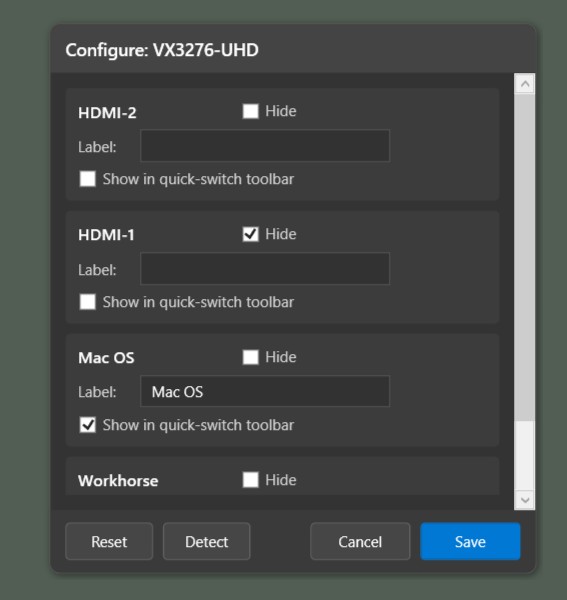
ポート検出とカスタマイズ
利用可能な入力ポートを自動検出し、セットアップに合わせて名前を変更、未使用ポートを非表示にしてインターフェースをすっきりさせます。
電源管理
オン、スリープ、オフコマンドでモニターの電源状態を制御。スケーラーロックアウトの問題を防ぐシステム復帰保護機能を搭載。
多言語サポート
英語、スペイン語、フランス語、ドイツ語、中国語、日本語、ポルトガル語、イタリア語、ヒンディー語に対応し、システム言語を自動検出します。
Ready to simplify your multi-monitor workflow?
Download Monitor Control Manager and take control of your displays in seconds. Free, open source, and built for Windows 10/11.
Get Started